Buyers keep shopping
Company buyers select the products and quantities they actually need in the storefront.
 ApproveCart B2B
 Internal purchasing control for Shopify B2B
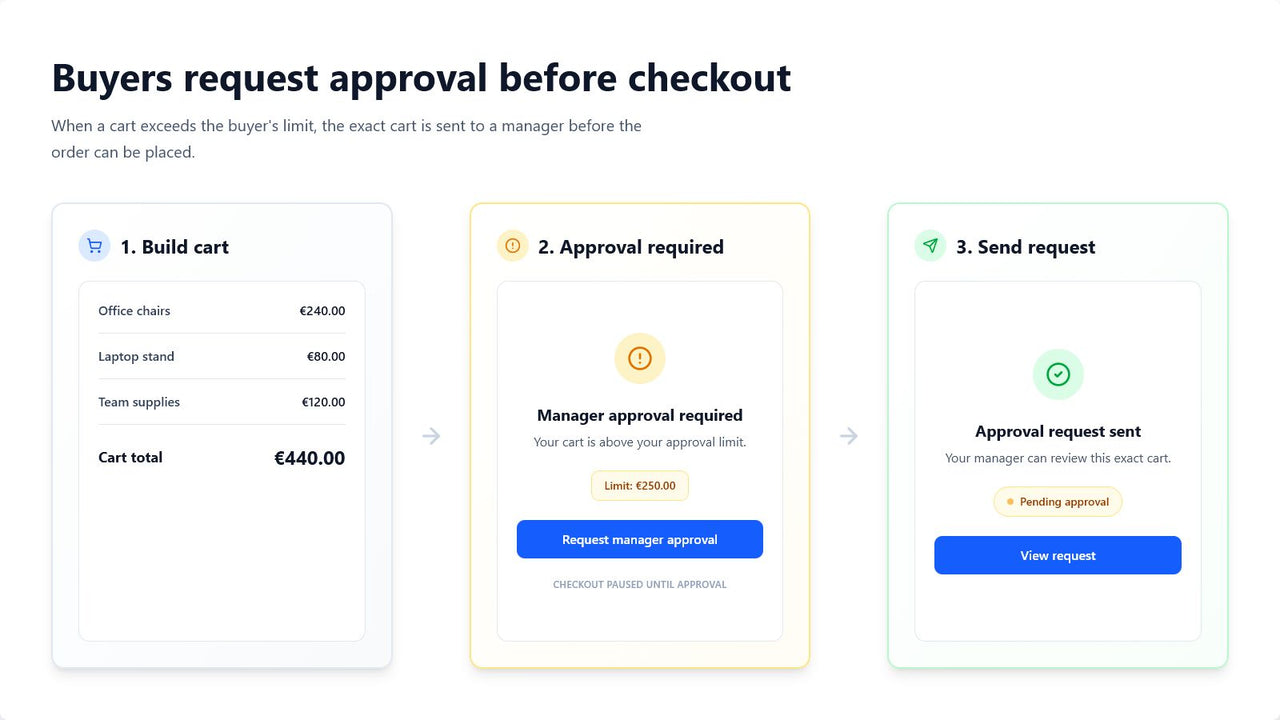
Let company buyers submit carts for approval before checkout. Buyers and assigned approvers can refine a pending cart, and approval protects the final saved version.
10-day free trial · Plans from $19 USD/month
Requires Shopify B2B companies, company locations, and new customer accounts. Not for retail customers.
The control gap
Shopify B2B buyers can build their own carts. ApproveCart adds the internal review step between that buying activity and checkout.
Company buyers select the products and quantities they actually need in the storefront.
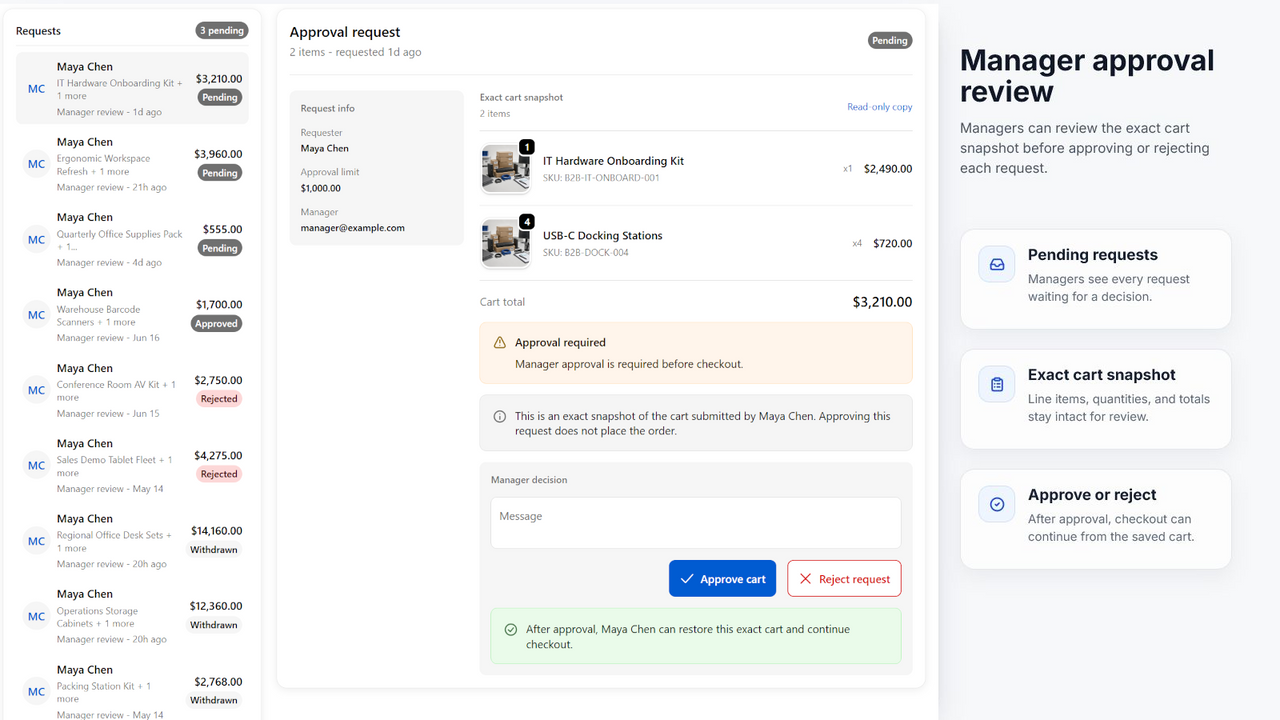
Approvers can adjust quantities, remove items, or add products from the company catalog before approving the final version.
The approved buyer can continue only while the checkout cart still matches the approval.
How it works
The buyer starts the request, the buyer or assigned approver can refine it while pending, and the app validates the final approved cart at checkout.
The buyer shops with their Shopify B2B company account.
The buyer or assigned approver can adjust quantities, remove items, or add products from the company catalog.
The assigned approver receives an email with the request details and a link to review it.
The buyer restores the final approved cart and checkout protection validates that exact version.
After approval or rejection, the buyer receives the decision by email.
Spend controls
Start with a merchant default, refine it by company, and override it for an individual buyer when needed.
Exact-cart protection
Edits saved while a request is pending become part of the version that is approved. After approval, the buyer must check out with that exact protected cart.
Real product views
These are current ApproveCart product screens from the Shopify App Store listing, not conceptual mockups.
Choose the right review workflow
Both workflows can begin with a buyer-built cart. The difference is who reviews it and whether that review happens before or after the buyer submits checkout.
| Question | Shopify B2B draft review | ApproveCart |
|---|---|---|
| Who builds the cart? | The B2B customer | The B2B customer |
| What is submitted? | Checkout as a draft order | An internal approval request |
| Who reviews it? | The merchant or merchant staff | An approver at the buying company |
| When is it reviewed? | After checkout is submitted as a draft | Before the buyer completes checkout |
| Can the submitted cart be adjusted? | The merchant can change the submitted draft | The buyer or assigned approver can edit the pending request |
| Primary purpose | The merchant reviews the incoming order | The company reviews an employee's purchasing authority |
| Conditional approval | Not the core of the native workflow | Spend limits and approval rules |
Pricing
Both plans include a 10-day free trial. Growth adds advanced rule targeting, approver self-management, and approval expiry.
Starter
$19 USD / month
Core approval controls for smaller B2B purchasing teams.
50 approval requests per rolling 30 days
10-day free trial
Install StarterGrowth
$49 USD / month
Advanced rules and team controls for operating approval workflows.
Unlimited approval requests
10-day free trial
Install GrowthFrequently asked questions
Quick answers about the workflow, account requirements, and the difference from draft orders.
ApproveCart B2B is a Shopify app for internal B2B purchase approvals before checkout.
An active approver assigned to the same Shopify B2B company can approve it. One approver can manage multiple buyers in that company.
Yes. A buyer submits the cart for internal approval first and can continue to checkout only after an approver accepts the request.
Yes. You can use a merchant default, a company policy, or an individual buyer override. Approval is required when the cart subtotal is greater than the effective limit.
The buyer restores the approved cart and proceeds to checkout. ApproveCart checks the cart again before checkout so the approved request still matches.
Yes. While a request is pending, the buyer and assigned approver can adjust quantities, remove items, or add products from the company-location catalog. Changes must be saved before approval.
No. Shopify B2B draft review lets a buyer submit checkout as a draft order for merchant review. ApproveCart sends an internal approval request to an approver at the buying company before the buyer completes checkout.
ApproveCart uses Shopify's new customer accounts. Classic customer accounts are not supported for this workflow.
No. The buyer must be signed in and associated with a Shopify B2B company and company location.
Start with a 10-day free trial
Install ApproveCart B2B, configure company approvers and buyer thresholds, then test the workflow with a Shopify B2B company account.